
INTERNAL NETWORK SECURITY
Internal Penetration Testing Services
Manual testing from inside your network, starting from a standard user account, to show what an attacker reaches once they are already past the perimeter.
What an internal test covers
- Assumed breach from a standard user account
- Active Directory paths to domain admin
- Lateral movement and privilege escalation
- Network segmentation verification
- Retest available after you fix the findings
Fixed scope, fixed tester-days, fixed price, agreed before testing starts.
Scoped and quoted per engagement. Priced in tester-days, no hidden fees. How the test works · See a sample report
Internal penetration testing is a manual security assessment run from inside your network, where testers start with the kind of foothold an attacker would realistically obtain and then find out how far it goes. It does not ask whether someone can get in. It asks a harder question: when someone is already in, what can they reach, how quickly, and what stops them?
That starting position is rarely exotic. A laptop infected through a malicious attachment, a user who typed credentials into a convincing phishing page, a guest device on the office Wi-Fi, an employee working out a notice period, a supplier with a remote access account. Each of these is a normal Tuesday for most organizations, and each drops an unprivileged presence into the same network that holds your file shares, backups and domain controllers. An external penetration test measures the wall. An internal test measures what happens after someone is over it.
Key takeaways
- Internal penetration testing measures blast radius: what one compromised account or workstation can reach across your network.
- We work from an assumed breach, which puts the budget into attack paths rather than into re-proving that a firewall exists.
- Active Directory is the primary target, because most internal compromises end at domain admin through a chain of small configuration errors.
- Segmentation testing is reported separately and maps directly to PCI DSS scope questions.
- Internal network testing is quoted per engagement, with a typical effort of 5 to 10 tester-days depending on hosts, sites and domains.
- PCI DSS v4.0 requirement 11.4 asks for internal testing explicitly, not only external.
Assumed breach
We start where a phishing email ends: one ordinary account on one ordinary machine.
Active Directory first
Service accounts, delegation, certificate services and the paths they open to domain admin.
Full attack path
You get the chain, step by step, not a list of findings with no story between them.
Re-test after fixes
A retest is available once your team ships the fixes: we verify them and update the report.
Why we start from an assumed breach
We start from an assumed breach because the perimeter is the least interesting part of the problem and the most expensive to attack. Spending half an engagement trying to find a way through the edge produces one of two outcomes: the testers get in, and you learn what you would have learned anyway from an external test, or they do not get in, and the internal network goes unexamined while the budget runs out. Neither result tells you what happens on the day a user opens the wrong file.
Assumed breach is a methodological choice, not a shortcut. Real attackers rarely break the perimeter with a clever exploit. They buy credentials, phish a user, or ride in on a third party. By agreeing the foothold up front, we convert the whole testing window into attack path analysis: enumeration, credential recovery, privilege escalation, movement toward data. It also changes what you can fix. A blocked perimeter attempt tells you a rule worked. A completed internal path tells you which service account, share permission or delegation setting turned one infected laptop into control of the domain, and which link is cheapest to break.
Know what you want tested?
Send us your scope and get the test type, tester-days, timeline and a fixed price in writing. Prefer to compare first? See our prices.
Active Directory is the main target
Where internal tests almost always find the path to full control.
Active Directory is the main target because it holds the keys to everything else. In a Windows environment, domain compromise is effectively total compromise: file servers, email, endpoints, backup systems and often the virtualization layer all authenticate against the same directory. Active Directory penetration testing is therefore the core of the engagement, and a standard user account is enough to begin.
Here is what we look for and why each item matters to you:
Domain enumeration from a normal account
Any authenticated user can read most of the directory, which means an attacker learns your admin groups, service accounts, password policy and trust relationships within minutes of landing.
Weak and reused service account passwords
Service accounts often carry passwords set years ago and never rotated, and the same password frequently appears across several systems, so cracking one opens many.
Kerberoasting
Any user can request a service ticket and attempt to crack it offline, so a service account with a guessable password and high privileges is a direct route to administrative access with no alerts raised along the way.
AS-REP roasting
Accounts configured without Kerberos pre-authentication hand out crackable material to anyone who asks, and these settings usually survive from a legacy application nobody owns anymore.
Delegation misconfigurations
A server trusted to act on behalf of other users can be abused to impersonate an administrator, which turns one compromised application host into a domain-wide problem.
Certificate services misconfigurations
A certificate template that lets low-privileged users request a certificate on behalf of anyone else is a quiet, reliable path to domain admin that leaves normal-looking authentication logs.
Excessive permissions and nested groups
Rights granted for a one-off project accumulate over the years, and group nesting hides the fact that a helpdesk role now inherits the ability to reset privileged accounts.
Paths to domain administrator
We chart every route we find from the starting account to full control, then rank them by how easy each one is to cut.
How lateral movement and privilege escalation build a path
Lateral movement turns one workstation into a path across the network, and it usually runs on legitimate credentials rather than exploits. A tester recovers a cached credential from the first machine, uses it to authenticate to a second machine where that account is a local administrator, harvests whatever is in memory there, and repeats. Each hop is an ordinary authentication event. The techniques involved are catalogued publicly in the MITRE ATT&CK lateral movement tactic, which we use as a common reference when reporting findings to your defensive team.
The part that surprises most clients is how harmless the individual ingredients look. A local administrator password shared across the desktop fleet is a low finding on its own. A backup agent running as a domain account is a documented design decision. A file share readable by all staff is a convenience. Chain them together and you get a path from an infected laptop to the backup server, which holds credentials for every system it protects, including the ones your recovery plan depends on.
Privilege escalation happens on the host as well as in the directory. Writable service binaries, scheduled tasks running as privileged accounts and stale local admin rights left over from a software rollout all promote a standard user to local administrator, which feeds the next hop. We report the chain in order, with evidence for each step, so your team can see which link to cut first and what that single change removes from the map.
Does your network segmentation actually hold?
Segmentation testing answers whether your VLANs and firewall rules separate what they are documented to separate. The answer is frequently no, and the gap is usually accidental: a rule added for a migration that nobody removed, a management VLAN reachable from the user network, a printer segment with an unexpected route into the server range, or a jump host that talks to everything because that was simpler to configure.
We test segmentation as its own exercise and report it separately from the attack path work. Testers are placed in each defined zone and attempt to reach hosts and services in the zones that should be unreachable, then document what answered, on which port, from where. The deliverable is a matrix of intended versus actual reachability, usable as evidence for PCI DSS scope reduction, where segmentation is what keeps systems out of the cardholder data environment. If segmentation fails, your audit scope grows, so this result often carries more financial weight than any single vulnerability in the report.
When segmentation also has to hold for Wi-Fi, remote access and cloud zones, network and infrastructure penetration testing extends the same reachability matrix across them.
Credential hygiene and what gets left behind
Credential hygiene testing looks for the passwords your environment stores without meaning to. Attackers rarely need to crack anything when the credentials are sitting in plain text somewhere a standard user can read. We search the places they actually accumulate:
- Memory on shared machines. When an administrator logs into a workstation to fix something, material tied to that session can remain recoverable to anyone with local admin rights on the same box.
- Network shares. Deployment folders, IT documentation, exported configuration files and spreadsheets named for convenience regularly contain working credentials readable by every employee.
- Scripts and scheduled tasks. Automation written years ago often embeds a service account password directly, and the task runs with privileges nobody would grant today.
- Group Policy and deployment artifacts. Provisioning files, installer packages and configuration templates can preserve credentials from an earlier rollout long after the project closed.
- Password reuse across tiers. The same password protecting a test server and a production database collapses the boundary between them.
What we need before testing starts
We need a connection point inside the network, a low-privileged account and an agreed window. The inputs are deliberately minimal, because a realistic starting position is the whole point of the exercise.
A foothold in the network
A standard corporate workstation, a virtual machine on the internal network, a physical device we ship and you plug in, or remote access through a VPN account.
One standard user account
A normal domain account with no special rights, matching what a phished employee would have. No administrative access is provided at the start.
A testing window
Agreed dates and hours, including any change freezes, month-end processing or maintenance periods to avoid.
A named technical contact
Someone who can confirm whether an effect is ours, and who can authorize pausing the test immediately.
Agreed exclusions
Fragile legacy systems, specialized devices, and any action we should never attempt, written down before we start.
How an internal penetration test runs
Scoping and rules of engagement
We agree the network ranges, sites, starting position, testing window, excluded systems and escalation contacts in writing before any traffic is generated.
Network reconnaissance
We map live hosts, services, operating systems, shares and the directory structure from the starting account, building the picture an attacker would build in the first hours.
Attack path analysis
We combine directory relationships, permissions, credential exposure and host findings into concrete routes toward privileged access, then rank them by feasibility.
Exploitation and escalation with evidence
We follow the viable paths far enough to prove impact and no further, capturing commands, screenshots and timestamps for every step.
Reporting and retest
We deliver the report, walk your team through the attack paths, and a retest is available once the fixes are deployed.
What you receive
You receive two documents and the full attack path, and a retest is available after fixes. The Executive Summary is written for management: what an attacker starting from one laptop could reach, which business systems that exposes, and what to fix first. The Technical Report is written for the people who will do the work.
Each technical finding includes the affected hosts or accounts, a severity rating with the reasoning behind it, the evidence captured during exploitation, the business impact, and remediation that names the specific setting, permission or account to change. The attack path is documented step by step in the order it happened, so your team can replay it and confirm the break. Remediation is prioritized by how many paths each fix removes rather than by severity alone, because one permission change often closes several routes at once. After the changes ship, we rerun the original paths and confirm in writing whether each issue is closed.
How long does it take and what does it cost?
Internal network penetration testing is quoted per engagement, because the effort depends on the size and shape of your environment rather than on a standard package. A typical internal test runs 5 to 10 tester-days plus a few days to produce the report. We price in tester-days with no hidden fees, so the quote follows the work involved.
| What moves the price | Why it matters |
|---|---|
| Number of hosts | Enumeration, credential review and host-level escalation scale with the size of the estate. |
| Number of physical sites | Separate locations mean separate starting positions, separate network segments and often separate results. |
| Active Directory domains and forests | Each domain adds its own permission model, and trust relationships between them create additional paths to analyze. |
| Segmentation scope | Testing reachability between zones grows with the number of zones and the rules that connect them. |
| Compliance requirements | Evidence mapped to named control requirements adds documentation time to the reporting phase. |
Send us a host count, a site list and the number of domains, and we will scope it against those numbers. Our pricing page covers the assessment types we quote as ranges, and the services overview shows how internal testing fits alongside cloud, application and red team work.
When is internal penetration testing required?
Internal testing is required whenever a framework asks you to test the effectiveness of security controls rather than merely document them, and several name internal testing explicitly. Regulators care about it because an external-only test leaves the assumption of a compromised endpoint untested, which is the scenario most incidents actually follow.
| Framework | Requirement | What it means internally |
|---|---|---|
| PCI DSS v4.0 | Requirement 11.4 | Calls for external and internal penetration testing at least every 12 months and after significant changes, with segmentation testing where segmentation is used to limit scope. |
| DORA (EU) 2022/2554 | Articles 24 to 27 | Financial entities run a digital operational resilience testing programme (Articles 24 and 25) covering the internal systems that support critical functions, and entities selected by their TLPT authority also run threat-led penetration testing for those in scope. |
| NIS2 (EU) 2022/2555 | Article 21 | Risk management measures include assessing whether security controls are effective, which covers access control and segmentation inside the network. |
| GDPR (EU) 2016/679 | Article 32 | Requires regular testing of technical measures. Personal data held on internal file servers and databases sits inside that obligation, as our GDPR and HIPAA penetration test for a medical SaaS platform shows in practice. |
Compliance cycles aside, four moments justify a test regardless of the calendar: after a security incident, to confirm the attacker’s path is closed; after an Active Directory migration or consolidation, when permissions and trusts are freshly rearranged; after an acquisition, when another organization’s network joins yours along with its history; and after a major infrastructure change such as a new site or a segment redesign.
What can you check before you hire us?
Three things you can verify for yourself: what the report looks like, who does the testing, and how a real engagement went.
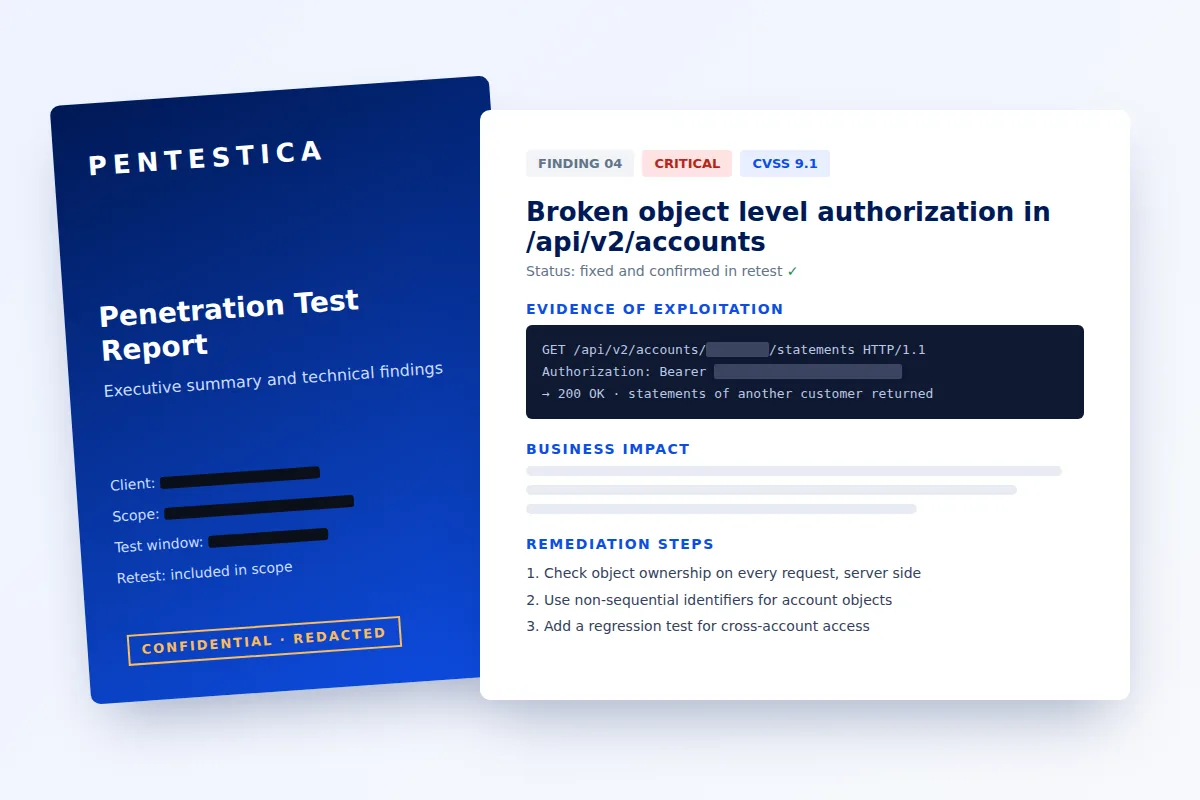
What does the report look like?
Every report opens with an executive summary for management, then one page per finding: severity and CVSS score, evidence of exploitation, business impact and step-by-step remediation. A retest is available after fixes, and the updated report shows which findings are closed. Browse our sample pentest report with every section explained.
Who tests your systems?
Senior pentesters from our team of 25, holding hands-on offensive security certifications such as OSCP and OSCE alongside CEH, CISA, CISM and CRISC.







Our case studies
How we tested a FinTech API, a medical SaaS platform and a retail web store: scope, findings, fixes and the retest.
Internal or external: which should you test first?
Internal testing assumes the attacker is already inside and shows how far they get. External testing shows what they can reach from the internet before that. If your perimeter has never been tested, start with an external penetration test; if phishing or a compromised laptop is your bigger worry, start here.
Frequently asked questions
What is the difference between internal and external penetration testing?
They answer different questions from different starting points. An external penetration test works from the public internet against the systems you expose, and measures whether an outsider can get in at all. An internal test starts inside the network with an ordinary user account or workstation, and measures how far a foothold spreads. Most frameworks expect both, because a strong perimeter and a flat internal network is a common and dangerous combination. Our network penetration testing page explains how the two combine in one engagement.
Do you need domain admin access to run the test?
No. We start with a standard user account and no elevated rights, because that is what an attacker gets from a phishing email or a compromised laptop. Reaching privileged access is one of the results we are testing for, so handing it over at the start would remove the point of the exercise. Some compliance-driven engagements add a separate privileged review of specific systems, which we scope as an addition rather than a replacement.
Can you test remotely or do you need to be on site?
Both work, and remote is the more common choice. We can test through a VPN account into your network, from a virtual machine you provision on an internal segment, or from a small device we ship and someone plugs in. On-site work makes sense when the scope includes physical network access, wireless testing, or multiple locations that are not connected the way the documentation claims. The starting position is what matters, not where the tester sits.
Will the test disrupt production?
Disruption is unlikely and we design the engagement to keep it that way. We agree exclusions for fragile systems before starting, control the pace of enumeration, never use denial of service techniques, and stop at proof rather than pushing an exploit further than needed. A named contact on your side can pause testing at any time, and we log our activity with timestamps so anything unusual can be checked against what we were doing.
Do you re-test after we fix the findings?
Yes, a retest is available after fixes. Once the fixes are deployed, we rerun the original attack paths and confirm in writing whether each finding is resolved, partially resolved or still exploitable. Partial results are common on internal tests, because a permission change often closes one route while a parallel path through a different group or service account stays open.
Fixed-price quote
Request an internal penetration test
Tell us what to test. You get a written scope, the number of tester-days and a fixed price before any testing starts. No hidden fees.
See a sample report first (18-page PDF, no email required)
Internal network tests are quoted per engagement and priced in tester-days. All prices
For a market reference, see the average pentest cost by type.
What happens after you send it
- Tell us what to test Send the number of hosts and sites, how many Active Directory domains you run, your deadline and any compliance requirement.
- Get a written scope and price We reply by email with scoping questions or a fixed quote in tester-days.
- Test, report, retest Most tests take 1–3 weeks plus a few days for the report. Critical findings are reported during testing. Retesting after fixes is available.
- OSCP, OSCE and CISSP certified testers
- 500+ penetration tests
- Aligned with OWASP WSTG, PTES and NIST SP 800-115
- Executive summary and technical report